Overview
This project is the Spot trading feature of a crypto trading platform. I was the only designer, and I designed the whole experience on mobile: placing an order, following it while it runs, and checking the result in the order history. The feature covers five order types: Market, Limit, Stop-limit, Stop-market and TWAP.
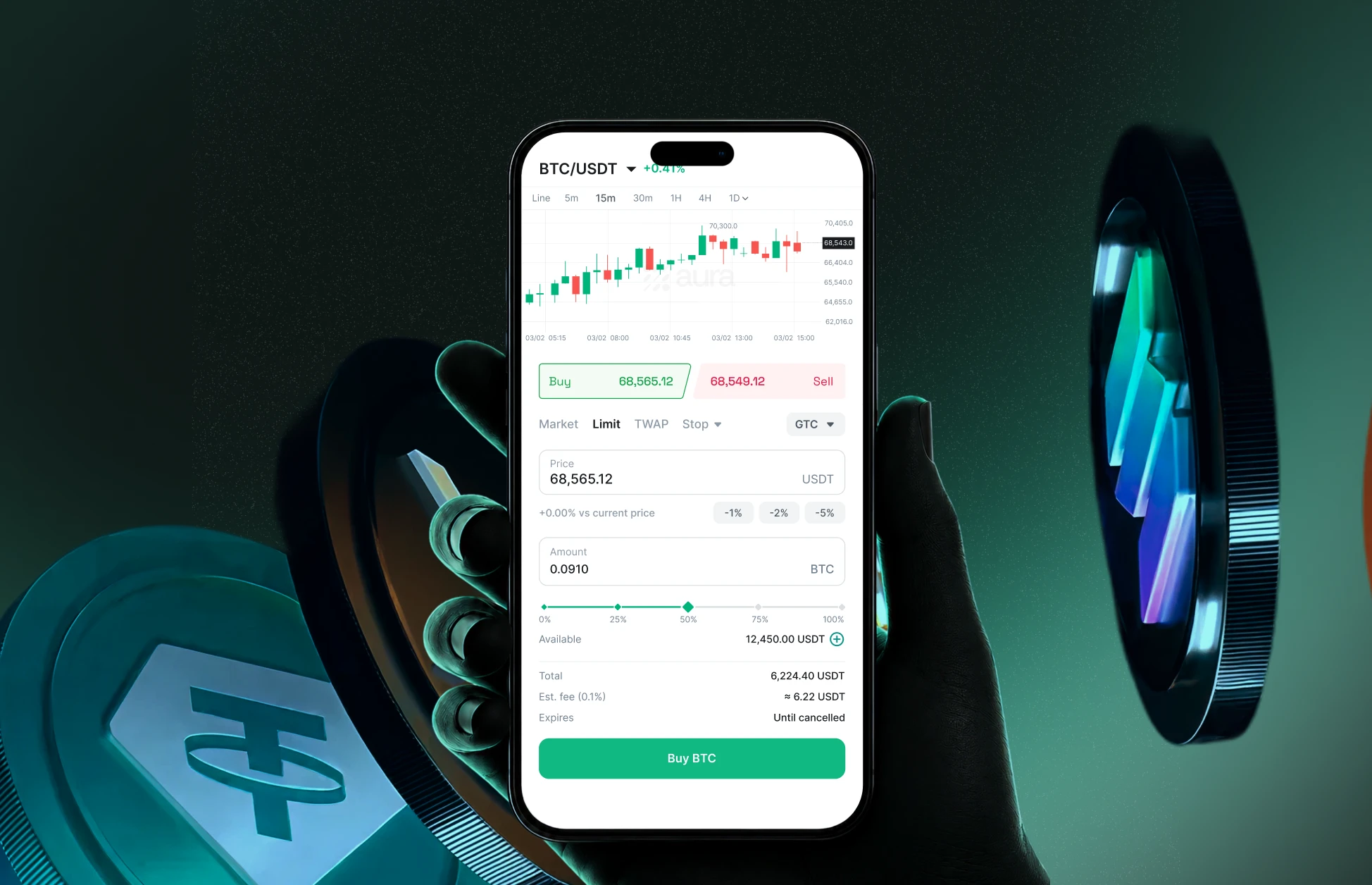
Problem
Clients need more than a simple buy button. They need five order types, and each one has different inputs. All of it has to fit on one phone screen, and most clients are not professional traders. The challenge was to give clients control over price and timing, without making the ticket hard to use.
Research
After a kickoff with the PMs and the Head of Wealth on scope, I started with the people who place trades for clients every day: the relationship managers (RMs) and the trading team.



Every order type follows the same steps: choose Buy or Sell, choose a type, enter an amount, and confirm.
Information architecture
1Place an order
- Buy / Sell
- Market
- AmountBTC ⇄ USDT
- % of balance255075100
- LimitPrice% vs priceGTC / GTD
- Stop ▾
- Stop-limitTriggerLimit price
- Stop-marketTrigger
- TWAP
- Total quantity
- Running time
- Execution priceMarketMax / Min price
- SummaryTotal ≈FeeExpires
- Confirm
2Open orders
- TabsLimitStopTWAP
- Order card
- Progress% filled
- DetailsPrice / TriggerFilled / AmountExpires
- ActionsCancelPause / Resume (TWAP)
- Empty state
- View all
3Order history
- FiltersTypeSide
- Order card
- ResultAvg. priceTotalFee
- StatusFilledPartially FilledCancelledExpiredFailed
- View all
I tested version 1 with the PM, RMs, the trading team and engineers. Their feedback changed three things:
Amount input
Feedback
“I want to know how much USDT to spend, not how many coins to buy.”
RMS
Decision
Add a switch button, so users can type in coin or USDT
Fills immediately at the best available price.
Insufficient balance
Amount in BTC only.
Fills immediately at the best available price.
Insufficient balance
Tap the switch to type in BTC or USDT.
Limit price
Feedback
“I want to tap a quick % from the current price, not do the math or type a guess.”
— Trading team
Decision
Add a group of % buttons. Tapping again adds up the %.
Insufficient balance
Price typed by hand.
Minimum price is 34,282.56 USDT
Insufficient balance
Tap the Buy price to fill -1%. Tap a % chip to add more.
Price can move
Feedback
“The price can move before my order fills. I need a limit on the worst price I’ll get.”
— RMS
Decision
Add a Max price for buy and a Min price for sell. If the limit is far from the market price, the screen warns that the order could fill at a much worse price, and the user can still place it.
Running time
Sub-orders only fill at or below your max price. Parts that can’t fill in an interval are skipped.
Max price, no warning at any distance.
Running time
Your max price is much higher than the market price. Your order could fill at a much higher price.
Sub-orders only fill at or below your max price. Parts that can’t fill in an interval are skipped.
Warns from +7% above the market. Tap a % chip to go further; the order can still be placed.
We did not test with real clients. RMs and the trading team were the closest we had.
Design Decisions
Trade-offs
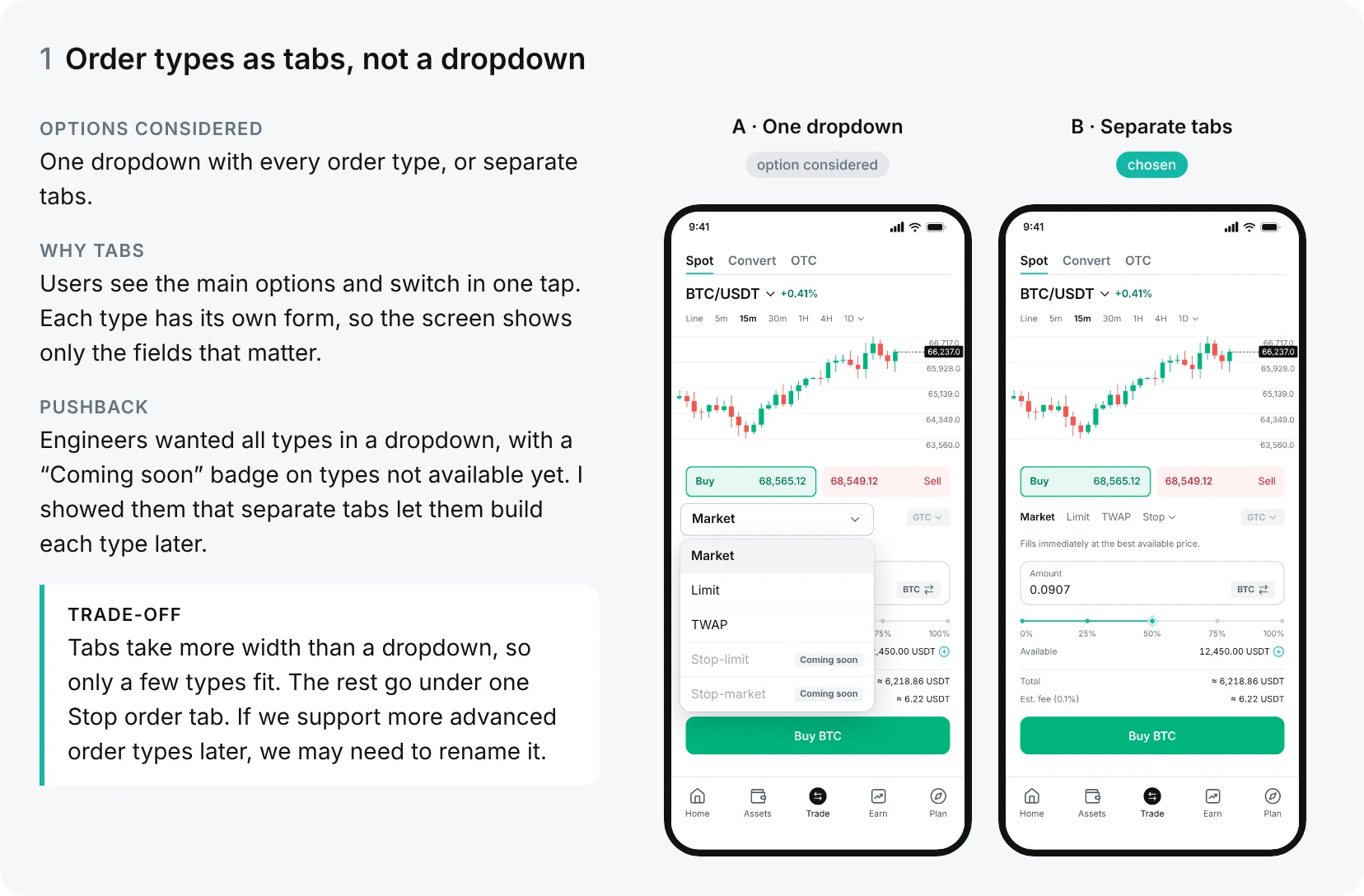
1. Order types as tabs, not a dropdown
Read the text in this image
Options considered: One dropdown with every order type, or separate tabs.
Why tabs: Users see the main options and switch in one tap. Each type has its own form, so the screen shows only the fields that matter.
Pushback: Engineers wanted all types in a dropdown, with a “Coming soon” badge on types not available yet. I showed them that separate tabs let them build each type later.
Trade-off: Tabs take more width than a dropdown, so only a few types fit. The rest go under one Stop order tab. If we support more advanced order types later, we may need to rename it.
A · One dropdown (option considered): a Market dropdown is open and lists Market, Limit, TWAP, Stop-limit (Coming soon) and Stop-market (Coming soon).
B · Separate tabs (chosen): the tabs Market, Limit, TWAP and Stop sit above the amount field.
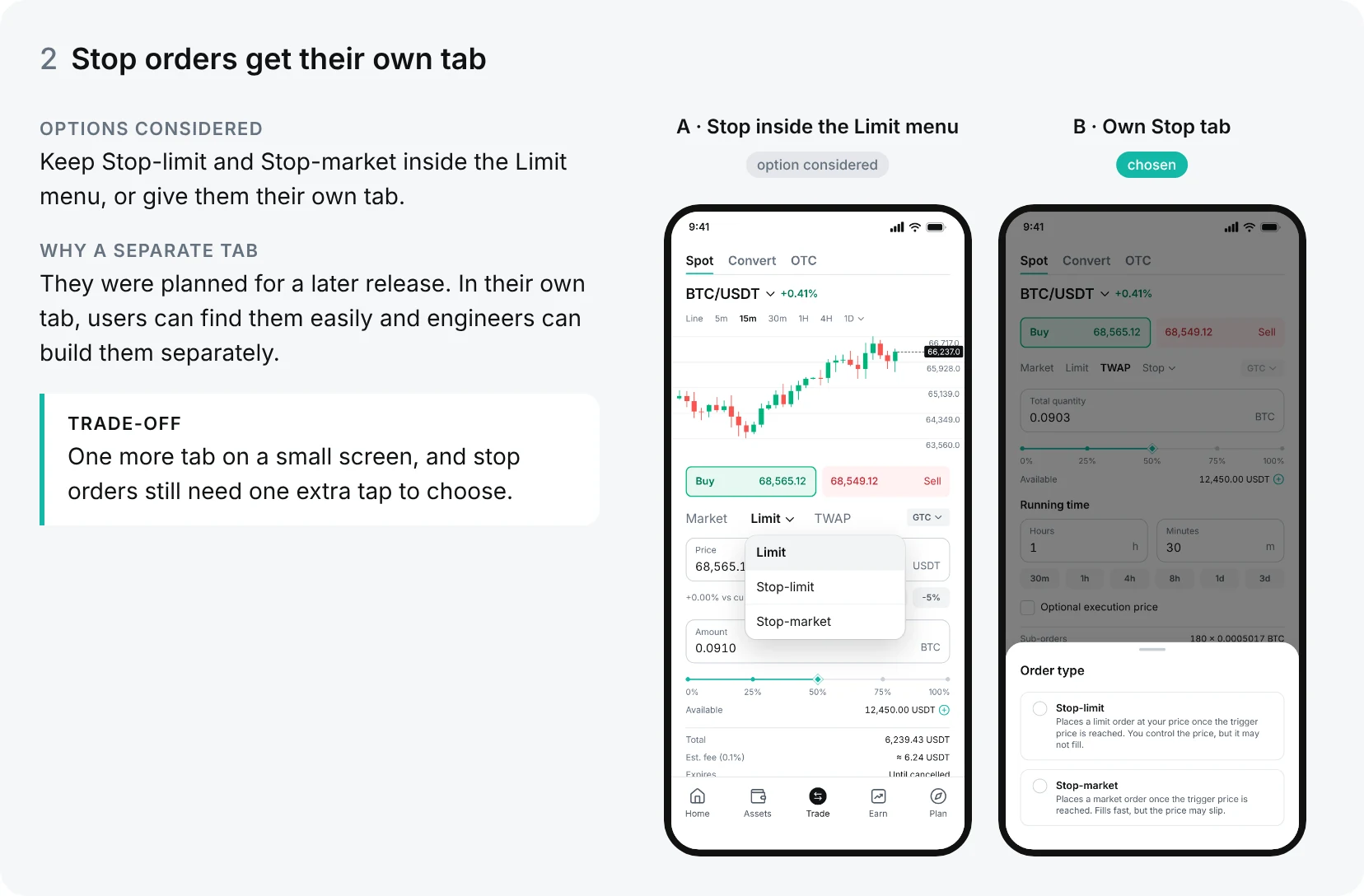
2. Stop orders get their own tab
Read the text in this image
Options considered: Keep Stop-limit and Stop-market inside the Limit menu, or give them their own tab.
Why a separate tab: They were planned for a later release. In their own tab, users can find them easily and engineers can build them separately.
Trade-off: One more tab on a small screen, and stop orders still need one extra tap to choose.
A · Stop inside the Limit menu (option considered): the Limit menu is open and lists Limit, Stop-limit and Stop-market.
B · Own Stop tab (chosen): an Order type sheet offers Stop-limit (“Places a limit order at your price once the trigger price is reached. You control the price, but it may not fill.”) and Stop-market (“Places a market order once the trigger price is reached. Fills fast, but the price may slip.”).
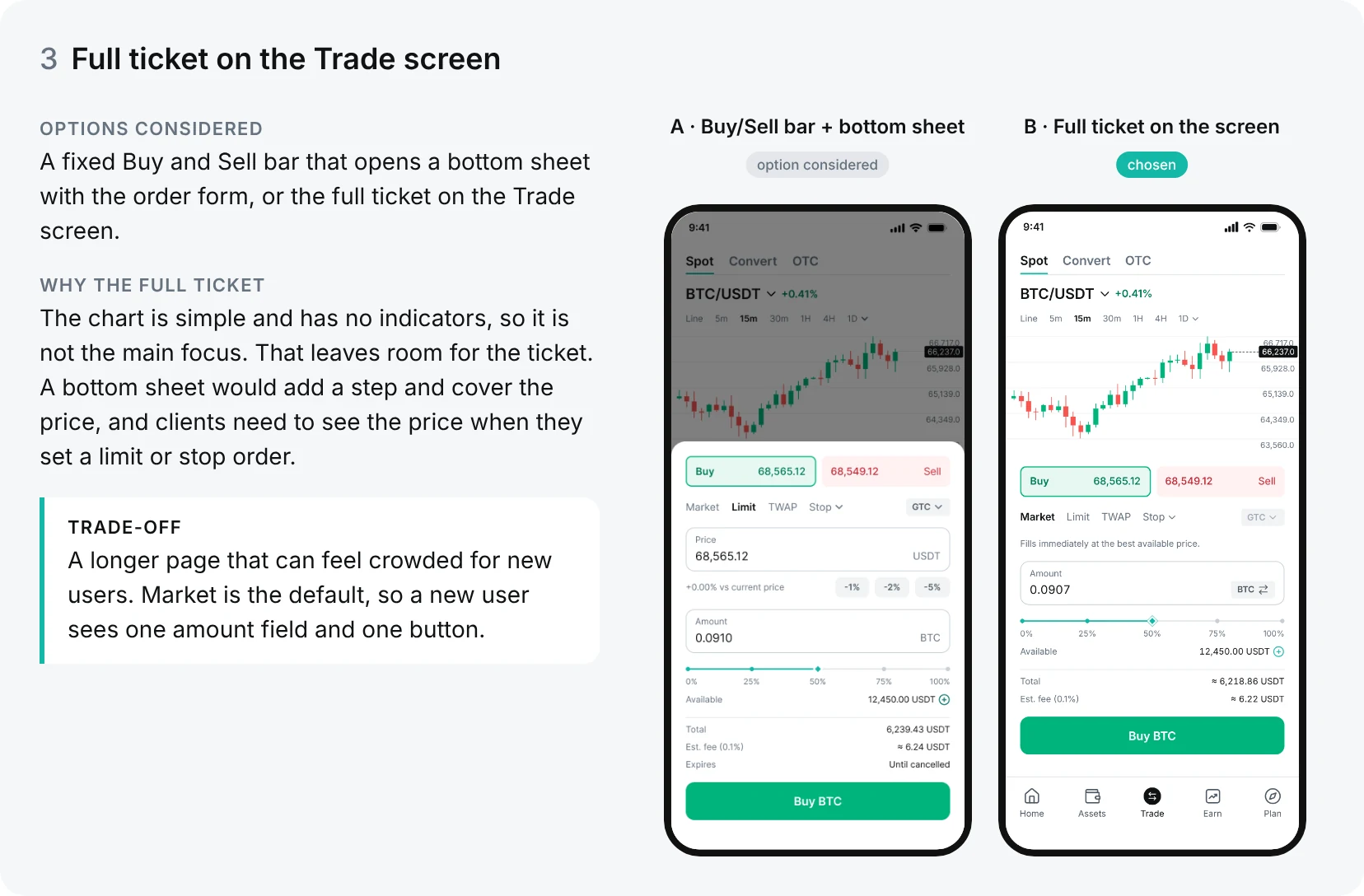
3. Full ticket on the Trade screen
Read the text in this image
Options considered: A fixed Buy and Sell bar that opens a bottom sheet with the order form, or the full ticket on the Trade screen.
Why the full ticket: The chart is simple and has no indicators, so it is not the main focus. That leaves room for the ticket. A bottom sheet would add a step and cover the price, and clients need to see the price when they set a limit or stop order.
Trade-off: A longer page that can feel crowded for new users. Market is the default, so a new user sees one amount field and one button.
A · Buy/Sell bar + bottom sheet (option considered): the Limit order form opens in a bottom sheet over the dimmed chart.
B · Full ticket on the screen (chosen): the Market form sits below the chart on the Trade screen.
Solution
Placing an order
Interactive prototype
Open orders & history
Interactive prototype
Outcome
I designed the full Spot trading feature: placing orders, open orders with pause, resume and cancel, and order history. I handed it off to engineering, and the first release shipped with Market and Limit. Then adapting the layout for desktop.
Reflections
The hard part was not adding five order types. It was keeping them simple enough for one phone screen. That is why the same layout can now grow into the desktop version.
If I did it again, I would test the values with real clients earlier. We still have not agreed on the final % values for the limit price buttons. One thing made it hard:
- Different pairs: BTC and smaller coins move differently, so one set of numbers cannot fit all of them.